


O'Reilly Pro
3.2343.00 Reviews
App Specs
- Version
- 1.23.0
- Updated On
- License
- Free
- Downloads
- 500,000+
- Developer
- O'Reilly Auto Parts
- Categories
- Auto & Vehicles
- Platform
- Android, iOS
Screenshots

 Analysis by AppCompare
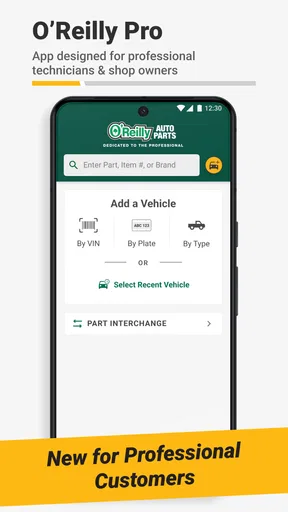
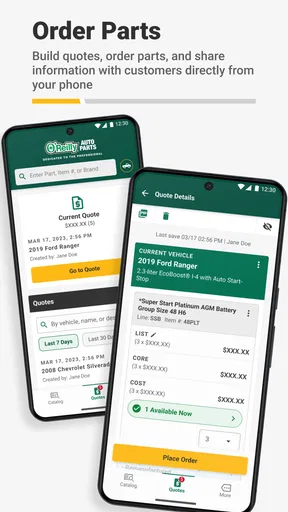
When I first opened O'Reilly Pro, I expected a focused tool for finding and ordering auto parts, not a general learning app. That distinction matters: this is an Auto & Vehicles app from O'Reilly Auto Parts, and its appeal rests on helping people get from a parts question to a practical next step. I see it as most useful when you already have a vehicle or part in mind and want a more direct route through the lookup and ordering process. It is free, rated for Everyone, and has a 3.7 average from around 760 ratings, so there is a sizeable audience, but the mixed score is a reminder to judge it by your own workflow rather than assume it will suit every shopper.
Where a parts-focused app can save time
Buying car parts often involves more than searching a name. You may need to work out whether a component fits your vehicle, compare possible options, and avoid placing an order for something that looks right but is not. A dedicated app can make that process more convenient than switching between a general web search, a store page, and notes on your phone. The useful habit is to begin with the details you know about your vehicle and the exact job you are trying to do, rather than browsing a broad category and hoping the right item appears.
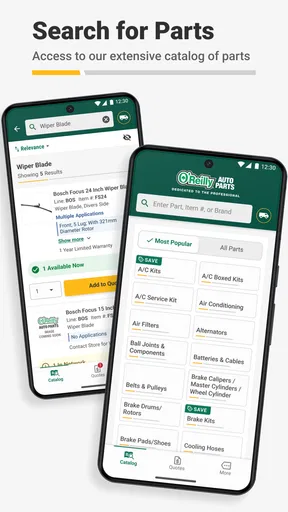
For example, imagine you notice a worn wiper blade while preparing for a rainy commute. Instead of waiting until you are at a counter to start figuring out what to ask for, you can use a parts lookup workflow to narrow the search before you leave home. If you are uncertain about the exact part name, identifying the job first—replacing a blade, checking a bulb, or finding a maintenance item—gives you a more useful starting point than entering a guess. The app’s stated purpose is to streamline lookup and ordering; I would treat that as a practical convenience, not a substitute for checking fitment carefully.
Make your search easier before you open the app
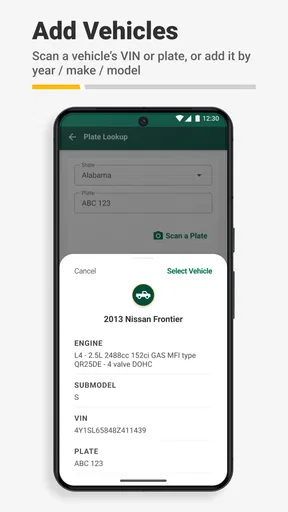
A small amount of preparation can prevent a frustrating search. Keep your vehicle’s year, make, and model available, and be ready to check any details that distinguish one version from another. If you are replacing a part, a photo of the old component or its packaging can also help you compare names and descriptions. These are sensible precautions for any parts-shopping tool, especially when several items seem similar. I would rather pause to verify the match than order quickly and discover that the part does not suit the vehicle.
It also helps to separate “I need this part now” from “I am researching a repair.” If you are ready to buy, focus on confirming the fit and the item you intend to order. If you are still diagnosing a problem, use the lookup as one piece of preparation and consult a reliable repair guide or a qualified mechanic when safety or uncertainty is involved. An ordering app can help you locate a product, but locating a product is not the same as proving that it is the correct fix.
How it fits beside familiar alternatives
The usual alternatives are a general search engine, a retailer’s website, or an in-person visit to a parts counter. General search is helpful for learning the name of a component or comparing explanations from different sources, but it can scatter the task across multiple pages. A retailer’s website may cover similar shopping needs, while a physical counter can be more reassuring when you want a person to help resolve an ambiguous fit. O'Reilly Pro is most compelling when you prefer handling the lookup and ordering steps on your phone and already know enough to search with purpose.
That convenience has a trade-off: a focused retailer app is not the same as a neutral comparison service across every seller. If your priority is checking prices or availability across several stores, you may still want to compare other sources before deciding. If your priority is keeping the process within O'Reilly’s shopping environment, using its dedicated app is the more straightforward route. I would choose based on the task rather than expecting one app to be the best tool for every stage of car repair.
Worth Reading Before You Choose

EA SPORTS FC Mobile 26 Is a Bigger Football Game, but It Takes Time

Flipboard Shows What News Apps Must Do Beyond the Feed

Switching to Android Auto Means Rethinking Your Driving Routine

Google Calendar Makes a Crowded Week Easier to Manage

Ludo King Makes the Most of the Minutes Between Plans

Baby Panda World Brings Quick Play to Modern Phones, but Its Game Library Feels Busy
Who is likely to get the most from it?
I would recommend trying it if you regularly maintain a vehicle, are comfortable identifying the part you need, or want a phone-based way to handle a parts search and order. It may also suit someone who prefers to prepare before visiting a store: looking up a likely match in advance can make it easier to ask a focused question if anything remains unclear. The app is free, which makes trying that workflow low-commitment, though convenience still depends on whether its process matches the way you prefer to shop.
On the other hand, I would not make it my only resource if I were diagnosing an unfamiliar mechanical problem, comparing products across multiple retailers, or unsure which of several similar parts is safe for my vehicle. In those situations, a repair manual, a trusted mechanic, or a conversation with a parts specialist may be more valuable than a fast search. The app can support a buying decision; it should not pressure you into making one before you have enough confidence in the match.
What to expect from the app’s maturity
O'Reilly Auto Parts released O'Reilly Pro on November 22, 2024, and version 1.20.0 is the current version. The app has passed 100,000 installs, but its 3.7 average suggests the experience is not universally smooth for everyone. I would take that as a reason to keep expectations practical: install it to see whether it makes your own lookup routine easier, and have a browser or in-store option ready if a search becomes awkward. A rating cannot tell me exactly which issue another person encountered, but it does argue against assuming every interaction will feel effortless.
Before relying on the app for an urgent repair, I would test it with a familiar, non-urgent item. That gives you a chance to learn how its search and ordering flow works without having a stranded vehicle or a deadline hanging over you. It also helps you decide whether you prefer entering vehicle details, searching by part description, or confirming choices through another channel. That simple trial is a better guide to everyday fit than downloading it only when you are already in a hurry.
One useful trade-off to keep in mind is speed versus certainty. A quick search can narrow the options, but taking a moment to compare the description with the job and the vehicle is still important. If you are shopping for routine maintenance, you may already know what you need and benefit from a shorter path. If the repair involves unfamiliar parts or safety-critical systems, slow down and verify your choice with a knowledgeable source. The app is best treated as a shopping aid, not an automatic diagnosis tool.
O'Reilly Pro is available for Android, with a minimum OS requirement of 9. That makes the platform and device version worth checking before you plan to depend on it. Its Everyone content rating also makes it broadly suitable from an age-rating perspective, although the app’s real audience is naturally people handling vehicle parts and maintenance. I would not choose it for entertainment or broad automotive news; its value is tied to the practical task of looking up and ordering parts.
One question many shoppers have is whether a parts app can replace asking an expert. In my view, it can reduce the number of basic steps, but it cannot remove the need for judgment when the vehicle information is incomplete or the repair is unclear. Another is whether it is worth keeping installed if you only shop occasionally. If you buy parts rarely, a browser or store visit may be enough; if you repeatedly look up maintenance items, having a dedicated option on your phone may save effort over time. The answer depends on your habits, not on a promise that every search will be faster.
There is also a difference between finding an item and completing a repair. If a part is unfamiliar, I would first make sure I understand what it does and whether replacement is within my skill level. A lookup can help turn a vague need into a clearer shopping question, but it does not provide hands-on guidance simply by presenting a product. For a routine replacement you have handled before, that may be all you need. For a repair where a mistake could affect safe driving, I would use professional advice alongside any app-based search.
Overall, my recommendation is specific: try O'Reilly Pro if you want a dedicated way to search and order auto parts through O'Reilly Auto Parts, especially when you already know the vehicle and the job. Keep another route available for uncertain fitment, diagnosis, or cross-store comparisons. That balance gives the app room to be useful without asking it to do more than a parts-shopping tool should.
First Impressions and User Interface
At first glance, O'Reilly Pro has a clean and intuitive layout. Navigating through the app is a breeze, thanks to its user-friendly interface. You’re greeted with a dashboard that organizes content into neat categories, making it easy to find exactly what you’re looking for. Whether you’re in the mood for a deep dive into data science or just want to skim some quick tips on coding, it’s all right there at your fingertips.
Content Richness
The app boasts a vast library of resources, including books, videos, and even live events. It's like having a personal library stocked with every tech topic imaginable. I found myself diving into a book about AI, and before I knew it, I was hooked. The content is not just extensive but also high-quality, curated by experts who know their stuff.
What’s even more impressive is the inclusion of interactive content. The interactive coding exercises are a fantastic way to apply what you’ve learned in real-time. It’s like having a personal tutor who guides you through complex topics, ensuring you truly understand the material.
Learning on the Go
One of the standout features of this app is its offline access. As someone who’s always on the move, being able to download content for offline use is a game-changer. Whether I'm on a plane or a train, I can continue learning without needing an internet connection. This flexibility is something I really appreciate.
Moreover, the app syncs seamlessly across devices. I could start a video on my tablet during lunch and finish it later on my phone while waiting for a coffee. It’s these little conveniences that make the learning experience smooth and enjoyable.
Community and Networking
Another aspect that I didn’t expect to find in O'Reilly Pro is the vibrant community. The app connects you with fellow learners through forums and discussion groups. It’s a great way to share insights, ask questions, and even collaborate on projects. I’ve met fellow tech enthusiasts who have enriched my learning journey, providing new perspectives and ideas.
Customization and Personalization
The app offers a personalized experience by recommending content based on your interests and previous activity. It’s like having a tailored learning path that evolves as you do. The more you use the app, the smarter it gets at suggesting content that matches your learning goals.
Plus, the ability to create playlists of your favorite content is a nifty feature. I’ve curated a playlist that I call ‘Weekend Deep Dives’ filled with topics I want to explore in more depth when I have extra time.
Final Thoughts
So, what’s the verdict? O'Reilly Pro is more than just an app; it’s a full-fledged learning companion. It caters to tech enthusiasts of all levels, offering resources that are both comprehensive and engaging. Whether you’re a seasoned professional or just starting out, there’s something here for everyone.
In a world where learning is key to staying ahead, having access to such a diverse range of resources is invaluable. If you’re eager to expand your skill set and explore new tech territories, I’d highly recommend giving O'Reilly Pro a try. Trust me, it’s worth every moment you’ll spend exploring its depths.
Pros
- Extensive library of tech and business content.
- Offline access for seamless learning.
- Interactive features enhance engagement.
- Regularly updated with new materials.
- Cross-platform availability enhances accessibility.
Cons
- Content may be overwhelming for beginners.
- Subscription cost might be high for some.
- Interface can be unintuitive at times.
- Requires a stable internet for best use.
- Limited non-technical content options.
FAQs for O'Reilly Pro
What features does the O'Reilly Pro app offer?
O'Reilly Pro provides a comprehensive library of tech and business resources, including eBooks, videos, and live online training. Users can access content offline, create playlists of favorite materials, and participate in interactive learning paths. It's designed for professionals and enthusiasts looking to enhance their skills.
Is an internet connection required to use O'Reilly Pro?
While an internet connection is needed to initially download content, O'Reilly Pro allows offline access to downloaded materials. This feature is particularly useful for users who want to continue learning during travel or in areas with limited connectivity.
Are there subscription fees associated with O'Reilly Pro?
Yes, O'Reilly Pro operates on a subscription model. Users can choose from various plans, offering different levels of access to the platform’s resources. Subscription fees can vary based on the type of access and duration, offering flexibility for users with different needs.
Can I sync my progress across multiple devices with O'Reilly Pro?
O'Reilly Pro supports cross-device syncing, allowing users to pick up where they left off on any device. This feature ensures seamless learning experiences, as your progress, notes, and playlists are synchronized across your smartphone, tablet, and computer.
What types of content are available on O'Reilly Pro?
The app provides a diverse range of content, including programming tutorials, business strategy guides, and insights into emerging technologies. Users can explore various formats like eBooks, interactive videos, and expert-led courses, catering to different learning preferences.


